
Scan Reddit for Startup Opportunities in ~3 Minutes (Evidence-Backed)
A fast, repeatable workflow: pick a Reddit source, choose a time range, click Analyze, and get opportunity cards with traceable evidence.
This guide is for builders and early founders who want to reduce the worst product risk:
Building something nobody wants.
Signal Hunt is built for speed and proof:
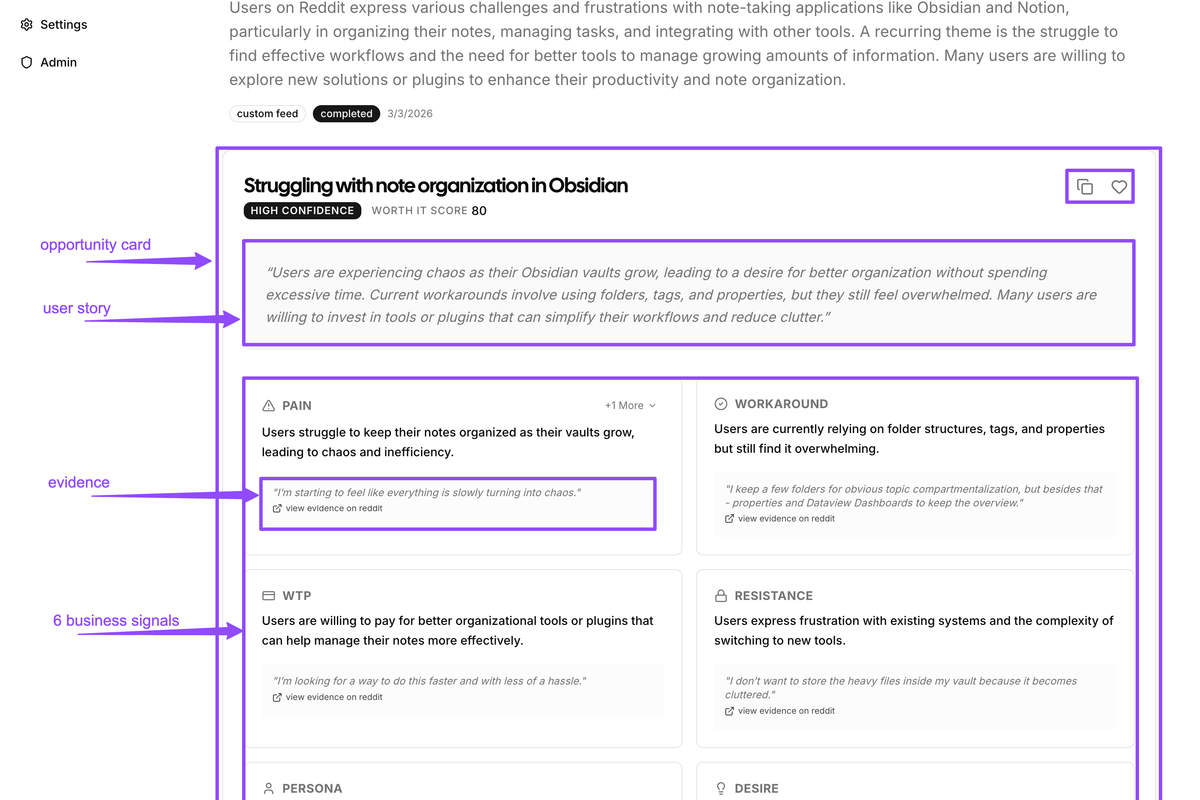
- It automatically clusters recurring pains into Opportunity Cards.
- It extracts a 6‑Business‑Signals Pack per opportunity.
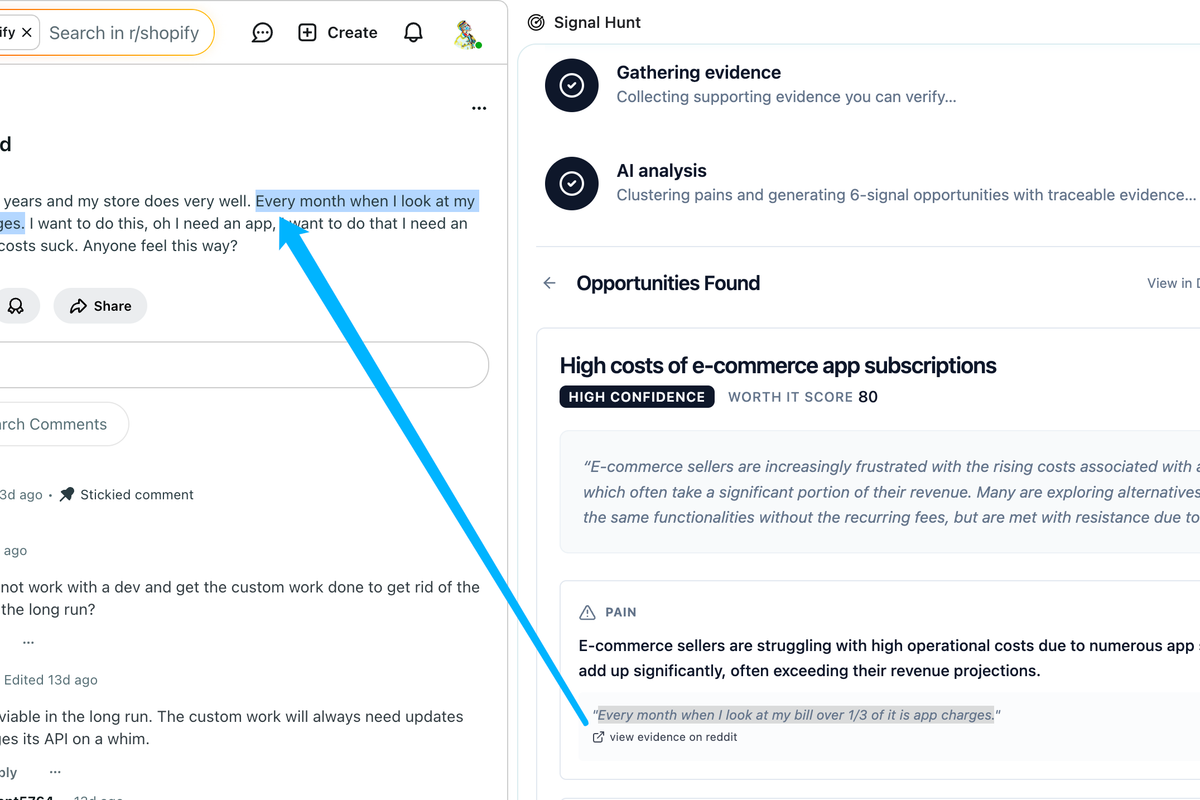
- Every claim links back to real Reddit sources (Evidence Pack).
- You can revisit results in your Dashboard and export as Markdown.

The Output (What You Should Have After ~3 Minutes)
At the end, you should have a report with:
- A ranked list of Opportunity Cards (Worth‑it Score + Confidence)
- A 6‑Business‑Signals Pack per opportunity (Pain, Workaround, WTP, Resistance, Persona, Desire)
- Click‑through evidence links for each signal
- A saved report in your Dashboard (for later review and sharing)
If you get 0 opportunities, don’t panic. It usually means you need a better terrain/time range (see Guide: “What to do when you get 0 opportunities”).
The ~3-Minute Workflow (Repeatable)
Step 1: Pick the Terrain (Where the Truth Lives)
Start from a Reddit place where your target persona describes workflows and problems:
- Subreddit:
r/SaaS,r/Entrepreneur, niche practitioner subs - Search results:
reddit.com/search?q=...(best when you already have keywords) - Custom feed (multi-reddit):
reddit.com/user/<name>/m/<feed>(reduces single-community bias) - Home / Popular / All: useful for broad discovery, less precise than search

Terrain rules:
- Prefer communities where people discuss work and process, not just news.
- Avoid meme-heavy pages.
- If you have a hypothesis, start from search keywords. If you don’t, start from a niche subreddit.
Step 2: Open the Signal Hunt Side Panel
On the Reddit page you chose, click the extension icon to open the side panel.
If you land on a thread page (a single post), the extension will show “Page Not Supported”. Switch to a subreddit, search results, or a custom feed.
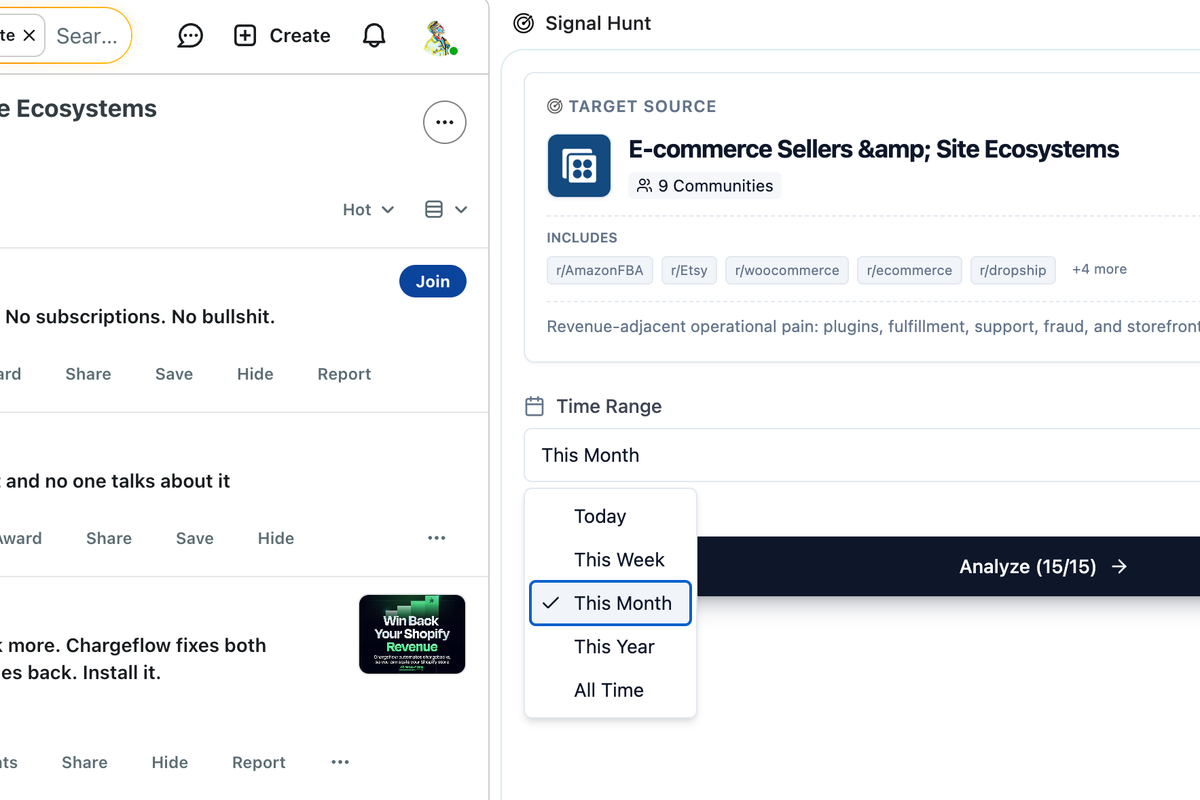
Step 3: Choose a Time Range
Pick how far back you want Signal Hunt to scan:
- Today (day)
- This Week (week)
- This Month (month)
- This Year (year)
- All Time (all)
How to pick:
- Fast-moving consumer/tool trends: start with Month.
- B2B workflows: start with Year.
- If you get 0 opportunities: expand the range.
Step 4: Click Analyze (One Click)
Click Analyze to start the automated pipeline:
- Collect posts
- Read key comments for context
- Identify business signals
- Gather evidence you can verify
- Run AI analysis and generate Opportunity Cards

Step 5: Review the Top Opportunities
In the results view, scan for:
- High Worth‑it Score
- Confidence = High/Medium when there’s stronger evidence
- Clear Pain with concrete costs (time/money/risk)
- Non-empty Workaround and/or WTP (strong validation signals)
Pro tip: if an opportunity has Pain but missing Workaround/WTP, treat it as “real frustration, unclear buying intent” until proven otherwise.
Step 6: Verify Evidence (Don’t Trust the Summary)
Click evidence links and read the originals. You’re looking for:
- Is the pain described in a real workflow?
- Are workarounds actual behaviors (not “it would be nice if”)?
- Is WTP explicit (prices, budgets) or implied (time cost, “we already pay X”)?
- What resistance shows up (migration, trust, complexity)?
If you want to pressure-test, also look for counter‑evidence inside the same threads:
- “Not a problem for me”
- “Solved by X”
- “Not worth paying for”
- “Wouldn’t trust a tool like this”
Make a Decision (Greenlight / Hold / Kill)
Use the Opportunity Card like a decision checklist:
- Greenlight: strong Pain + evidence of Workaround and/or WTP, resistance seems manageable.
- Hold: Pain is clear but Workaround/WTP is missing or thin → your next step is to collect missing signals.
- Kill: weak Pain, no real workarounds, or resistance dominates (e.g., “solved already / not worth it”).
Save, Share, and Compound Your Research
Once you pick a top opportunity:
- Click View in Dashboard to revisit the full report later.
- Use Copy as Markdown to paste into Notion/Docs and share with a cofounder.
- Favorite the opportunity in the Dashboard to build a personal “pain database”.
[IMAGE NEEDED: Screenshot of “View in Dashboard” and the Dashboard report page showing multiple opportunities.]
Recommended Next Read
- Guide #1: The 6 Business Signals Pack (so you know what “good evidence” looks like)
- Guide: How to read an Opportunity Card (to turn cards into decisions faster)
- Guide: What to do when you get 0 opportunities (fast troubleshooting)